Datasets
A dataset is the training data for a fine-tuning job, registered with the platform and shared across your organization. This page covers how to create datasets, the two ingestion modes, and the lifecycle a dataset moves through.
Dataset lifecycle
A dataset moves through a small set of states:
| Status | Meaning |
|---|---|
assembling | Created, but you are still writing data into it. Not yet usable by a job. |
ready | Sealed. Contents are fixed and the dataset can be used to train. |
error | Ingest or validation failed. |
deleted | Soft-deleted. Hidden from listings; bytes are reclaimed once nothing depends on it. |
Once a dataset is ready it is immutable. To change training data, register a new dataset. This
guarantees that a job’s recorded dataset always describes the exact bytes it trained on.
Formats
Datasets are typed by format. The format tells the platform what the data is and what validation to run:
| Format | Description |
|---|---|
conversational | Multi-turn chat examples (role/content message lists) in .jsonl. |
instruction | Instruction/response pairs in .jsonl. |
text | Plain text examples in .jsonl. |
pretokenized | Already-tokenized sequences in .jsonl. |
Validation runs when the platform knows the format and can read the data (typically during an import). Validation results (row count, schema checks, checksum) are recorded as metadata on the dataset. The format you choose should match the base model you intend to fine-tune.
Creating a dataset
There are two ways to get data into Token Factory. Both end in the same place: a sealed dataset, visible to your organization, that jobs can read.
Assemble mode
Use assemble mode when you want to write data into the dataset yourself, for example from a workspace or a job you control.
- Create the dataset with a name and a format. It starts in the
assemblingstate with a writable location reserved for it. - Write your training files into that location.
- Seal the dataset to mark it
ready. After sealing, the contents are fixed.
Import mode
Use import mode when the data already exists somewhere (object storage, another shared location). You give Token Factory the source location and a format; the platform copies the bytes into managed storage, validates them if the format is known, and seals the dataset automatically when the copy completes.
The import runs in the background. The dataset stays assembling while the copy is in flight
and becomes ready (or error) when it finishes.
Listing and inspecting
Token Factory lists your datasets with their name, format, status, creation time, and metadata (row count and other derived fields where available). You can filter the list by status or format to find a dataset to train on.
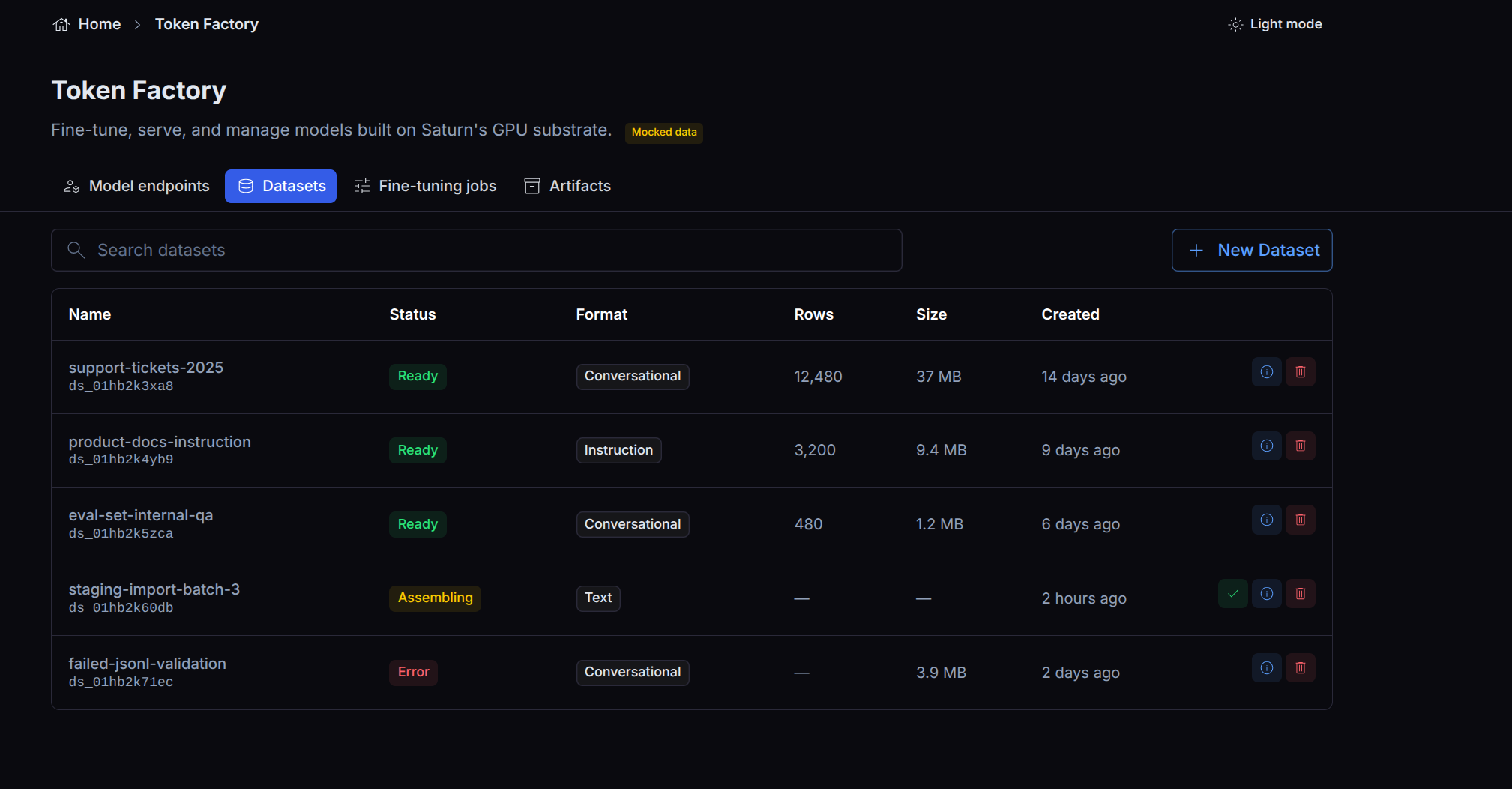
A dataset stays in assembling until it is sealed; sealed datasets show as ready and are the
ones a fine-tuning job can use.
Visibility and access
Datasets are owned by your organization and visible to every member. Any organization member can list a dataset and mount it read-only into a workspace to inspect the training data. The canonical copy is read-only to ordinary users: you cannot overwrite a sealed dataset, which is what makes the catalog trustworthy.
Deleting a dataset
Deletion is a soft delete: the dataset disappears from listings immediately, and the underlying bytes are reclaimed later, once nothing depends on them. A delete is rejected if the dataset has active consumers (for example a running job reading it).