GPU capacity lives in more places than any single cloud will sell you. In a given week, the cheapest available H100 might be on Nebius, the cheapest RTX 4090 on some regional provider you’ve never integrated with, and the only B200s in stock behind a marketplace like Shadeform. If your platform is pinned to one cloud’s API, you can’t reach any of that. If you integrate each provider by hand, you end up maintaining N different provisioning code paths that all drift.
The alternative is to rent a machine from whoever has it cheapest, join it into a Kubernetes cluster you control, and run the same workloads on it that you run everywhere else. This post walks through how to do that. The building block is k0smotron, which lets a control plane and its workers live apart. We use that to put the workers in a different cloud from the control plane, renting them from Shadeform and running GPU workloads on them. I’ve included the steps that don’t work on the first try, since those are the ones you’ll want to know about before you build this yourself.
Our reason and yours are probably different
We’re a platform. Saturn Cloud runs AI workloads on behalf of customers, so we care about acquiring GPU capacity wherever it’s cheapest and available and presenting it as one pool. Any given day, the best price or the only stock might be on a provider we don’t otherwise use, and a rented node we can join into a control plane we own lets us treat all of that as fungible supply. That’s a margin-and-availability motive specific to running a platform.
You probably aren’t doing that. If you’re an infrastructure team, the same mechanism solves a different problem. Some reasons we’ve heard:
- Burst past a fixed contract. You have committed capacity on one cloud and occasionally need more than it holds. Rather than raise the commitment, you rent the overflow elsewhere and join it to the cluster you already run.
- Consolidate scattered rentals. You already rent GPUs from two or three providers for different teams. Joining them all to one control plane gives you a single place to schedule, meter, and set policy, instead of N disconnected clusters.
- Avoid lock-in. You want your workloads portable across providers, so the day a price changes or a region fills up, moving is a node-join rather than a migration.
- Skip a control plane per site. You have machines in a few locations and don’t want to operate a full Kubernetes control plane in each. One hosted control plane, workers joining from everywhere, is less to run.
The mechanics below are the same regardless of which of these is yours. Where our platform-operator reasoning changes a design choice (it does, once), I’ll call it out.
The model: hosted control plane, remote workers
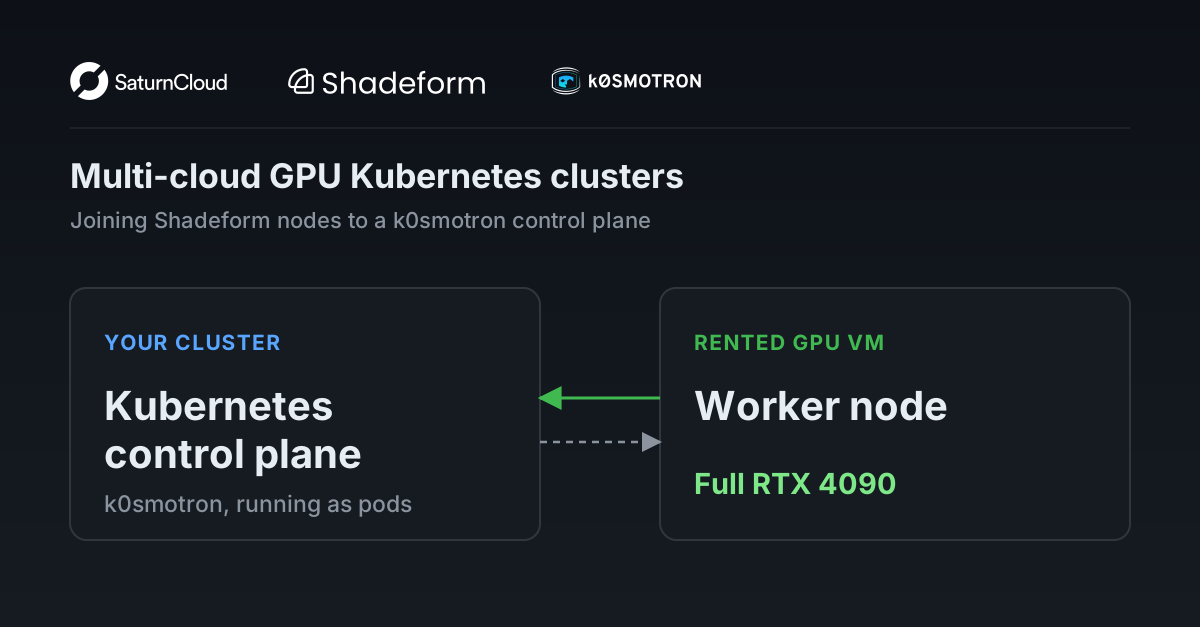
k0smotron gives you a full Kubernetes cluster whose control plane (apiserver and etcd) runs as ordinary pods inside a management cluster you already operate, instead of on dedicated control-plane machines. It is a Kubernetes operator, built on k0s, and the point for us is what it lets the workers do: any node, anywhere, can join that control plane and show up as a normal worker in the cluster. Both are open source, originated by Mirantis and hosted under the Linux Foundation, with k0smotron a CNCF sandbox project; credit to the Mirantis team for building the piece that makes this whole approach possible. Those workers don’t have to sit near the control plane. You can run k0smotron with everything in one cloud; we place the control plane on our management cluster and rent the workers from a different cloud entirely. In that configuration a k0smotron “spoke” is:
- A hosted control plane (apiserver and etcd running as pods) on the management cluster
- Remote worker nodes that join it over the internet, from whichever cloud has the cheapest GPUs
The control plane is yours. The workers are rented metal from whoever is cheapest. When you want capacity, you rent a machine, run a join script on it, and it shows up as a node in a cluster you fully control. When you’re done, you delete the machine and the node goes away.
So the division of labor is: k0smotron provides the hosted-control-plane machinery. Placing the control plane and its workers in different clouds, and dealing with the consequences, is on us. (If you want the higher-level, batteries-included version of this, Mirantis also builds k0rdent, which wraps k0smotron and Cluster API with a management layer and service catalog. We wrote about pairing that with Saturn Cloud here. This post stays at the raw k0smotron layer to show the mechanics.)
Because you own the kubelet, the Kubernetes mechanics downstream (DaemonSets, device plugins, your scheduler) work the way they do in any cluster. What does not carry over for free is anything wired to the control plane’s home cloud. A cloud-specific CSI driver like EBS won’t mount on a node that isn’t in that cloud, so storage needs a provider-neutral answer rather than the one your management cluster already uses (we land on JuiceFS backed by Tigris; more below). Getting a host and making it joinable is small and isolated per provider; storage and the network fabric are the parts that actually vary, and the fabric is a section of its own further down.
Shadeform is a good first target because it’s an aggregator: one API in front of many underlying GPU clouds. A single integration against Shadeform’s create/list/delete endpoints gives you reach across all of its backing providers. (We covered where aggregators sit in the market in an earlier post; this is the hands-on follow-up.)
What actually works
Two things people ask about before anything else:
A workload can dispatch end to end. A Saturn Cloud workspace, created through the normal API, schedules onto a Shadeform CPU VM (Hyperstack, Oslo, $0.35/hr) that has joined a k0smotron spoke. The pod lands 1/1 Running, JupyterLab is live in the container, and its persistent volume is bound. The full chain:
Workspace recipe (pins the spoke as its target cluster)
  → the platform's dispatcher resolves the target and applies the manifests
    → k0smotron hosted control plane (running on the management cluster)
      → Shadeform VM (joined as a k0s worker)
        → pod Running, JupyterLab live, PVC Bound
GPU passthrough works on rented VMs. Run nvidia-smi inside a container, inside a pod, on a Shadeform RTX 4090 VM ($0.60/hr) joined to the same kind of spoke, and it sees the full card: 23028 MiB, driver 570.195.03, CUDA 12.8. That’s dedicated PCI passthrough, the whole GPU with full VRAM, not a fractional slice.
People sometimes worry about nested virtualization when renting VMs instead of bare metal. It isn’t a problem here, because the stack is a single passthrough hop:
physical GPU
  → cloud hypervisor PCI passthrough → Shadeform VM
    → k0s worker on the VM's host OS (not a nested VM)
      → container + NVIDIA runtime (shares the host kernel; not a VM layer)
        → GPU (real PCI device, full VRAM)
The VM is the cloud’s own virtualization layer. The k0s worker and its containers add zero VM layers on top. Nesting would only bite if the GPU workload itself ran in a VM-isolated runtime (Kata, gVisor), and the setup here uses plain containerd and runc. Shadeform’s catalog is mostly VMs (254 VM types against 18 bare-metal at last count), so this matters: VMs are the common case, and passthrough works fine on them.
What it takes to get GPUs scheduling
Getting from “the VM boots” to “a CUDA pod schedules” takes some setup. The provider hands you a machine with the NVIDIA driver installed, but nothing about k0s or Kubernetes GPU scheduling is configured. There are four steps, and all of them belong in your node bootstrap script so GPU nodes join hands-off.
1. Point k0s’s containerd at the NVIDIA runtime. The Shadeform OS image ships the driver and nvidia-container-runtime, but its toolkit configures the system’s default containerd, not the one k0s runs. k0s imports drop-in config from /etc/k0s/containerd.d/*.toml, so write the runtime config there:
version = 2
[plugins."io.containerd.grpc.v1.cri".containerd]
  default_runtime_name = "nvidia"
  [plugins."io.containerd.grpc.v1.cri".containerd.runtimes.nvidia]
    runtime_type = "io.containerd.runc.v2"
    [plugins."io.containerd.grpc.v1.cri".containerd.runtimes.nvidia.options]
      BinaryName = "/usr/bin/nvidia-container-runtime"
      SystemdCgroup = false
2. Keep SystemdCgroup = false. k0s’s kubelet uses the cgroupfs driver. Set SystemdCgroup = true and runc rejects every pod sandbox with a cgroupsPath format error. Since nvidia is the default runtime here, that breaks every pod on the node, not just GPU ones, which makes it an annoying one to debug from the symptom.
3. Install the NVIDIA device plugin, and check where the kubelet socket actually lives. The device plugin DaemonSet is what exposes nvidia.com/gpu as a schedulable resource. It mounts the kubelet’s device-plugin directory, and on this k0s that path is the standard /var/lib/kubelet/device-plugins, not the /var/lib/k0s/kubelet/... path you might assume. Don’t assume a single k0s kubelet path for everything; check where kubelet.sock actually is.
4. Restart k0s after writing the containerd drop-in so it picks up the config.
For a production GPU spoke, steps 1 and 2 go into the join script, and step 3 is better handled by the NVIDIA GPU Operator (which automates runtime config, device plugin, and drivers) than by hand-rolled manifests, once you’ve pinned the kubelet-path quirks. After that, GPU nodes join with no manual steps.
Two networking problems, and which one you’ll actually hit
Single-node spokes work out of the box. Every early proof (a workspace, a job, a deployment, and a GPU pod) ran on one node and passed. The trouble starts the moment a second node joins and traffic has to cross nodes. Two different things go wrong here, and they show up as the same flaky-networking symptom, so it’s worth pulling them apart. One is a property of the cloud you rented from, with nothing to do with k0s or k0smotron. The other is a real consequence of running the control plane in a different cloud from the workers. You fix the first with config; you design around the second.
Problem 1: the cloud’s network fabric drops your overlay (fixable, and not a k0s problem)
This is the one that produced the alarming symptoms: flaky DNS, ClusterIP timeouts, a JuiceFS mount pod that hung. It looks like a latency or control-plane problem. It isn’t. It’s the cloud’s network fabric, and it would bite any Kubernetes distribution the same way. Hyperstack (the sub-cloud behind the Shadeform VMs we happened to rent) filters packets aggressively: it drops pod-source-IP packets as spoofed, and it drops IPIP-encapsulated packets (IP protocol 4) outright. Plain TCP, UDP, and ICMP between the VMs are fine, so the raw link is healthy. What’s dropped is exactly the encapsulation a typical pod overlay uses to cross nodes. Restrictive fabrics like this are common on marketplaces and neoclouds, and the failure has nothing to do with k0s, k0smotron, or the hosted-control-plane topology. It’s the cloud.
You have to pick a CNI that survives this fabric, and it takes some care, because two axes have to work at once: cross-node (a pod on one node reaching a pod on another) and host-to-pod (the node’s kubelet reaching a pod to run its readiness probe). We went through three CNIs before both passed.
The default (kube-router) fails cross-node. k0s ships kube-router v1.5.1, which crosses nodes either unencapsulated or over an IPIP overlay, both of which this fabric drops. So pod-to-pod across nodes is 100% loss, while everything on a single node is fine. That alone produces the whole symptom set. Cluster DNS load-balances across two CoreDNS replicas, one per node, so queries hitting the cross-node replica hung and DNS looked roughly half-broken. Any ClusterIP Service with an endpoint on the other node timed out the same way. And a JuiceFS CE mount pod resolving its in-cluster metadata engine across that dead path hung. (kube-router’s host-to-pod path is fine, since it uses a plain L2 bridge; the cross-node drop is its only failure. This is the CNI’s choice of encapsulation meeting the fabric, not a k0s defect; the same CNI on a permissive cloud is fine.)
The obvious upgrade (Cilium) fails host-to-pod, and this one is about Cilium and the kernel, not the fabric. The fix for kube-router’s cross-node drop is a CNI that encapsulates over UDP, which this fabric does pass, and Cilium’s VXLAN does exactly that: cross-node pod-to-pod and pod egress both worked, so Cilium cleared the fabric problem. But it introduced a different one that has nothing to do with Hyperstack. Shadeform’s default OS image runs kernel 6.8, and on that kernel Cilium’s eBPF host-to-pod path silently dropped: traffic from the node’s own network namespace to a pod IP died before it ever reached Cilium’s eBPF program, even same-node. That breaks kubelet readiness probes, so every pod-network pod stays 0/1, CoreDNS never goes ready, and cluster DNS falls over. We tried both Cilium 1.14 and 1.16, kube-proxy replacement on and off, BPF and iptables masquerade, legacy and eBPF host routing, with rp_filter disabled; none of it fixed the drop. This isn’t specific to this fabric or even to k0s: it maps to a family of open, unresolved upstream Cilium issues around the same-node eBPF redirect and FIB-lookup path under kube-proxy-replacement plus tunneling, reproduced by others across several kernels, clouds, and distributions, with no confirmed root cause or fix. (We didn’t run the clean isolation experiment to fully separate Cilium from k0s’s netns setup here, so we can’t say Cilium is categorically impossible on this kernel, only that we couldn’t make host-to-pod work and the upstream reports point at Cilium’s datapath, not the cloud.)
Calico clears both. The two bridge-based approaches (kube-router, Flannel) route host-to-pod through the plain kernel path, so that axis works for them; the trick is getting one of them to also cross the fabric. Calico in VXLAN mode does. We ran it with the overlay forced on for all traffic (CALICO_IPV4POOL_VXLAN=Always, not the CrossSubnet default, since our spoke nodes share a subnet and the fabric drops the native same-subnet path) on its standard iptables dataplane, which avoids Cilium’s eBPF host-to-pod path entirely. On a fresh two-node spoke, the whole matrix passes on the exact Shadeform fabric: cross-node pod-to-pod, host-to-pod, CoreDNS ready with working in-cluster DNS, and cross-node Service load-balancing.
The takeaway for anyone building this: don’t run the stock k0s CNI on a marketplace or neocloud fabric (its overlay is IPIP, which these fabrics block), and don’t reach for Cilium as the reflex fix without testing the host-to-pod path on your exact kernel first. A VXLAN overlay on a standard (non-eBPF) dataplane, Calico or Flannel, is the combination that clears both axes here.
Problem 2: long-lived watches over a WAN load balancer drift (design around it)
If Problem 1 was the cloud’s fault, this one is genuinely ours: it’s the price of running a k0smotron control plane in one cloud and its workers in another, and it’s the only issue in this post that traces to the hosted-control-plane-across-a-WAN topology. It’s real, narrower, and not something you config your way out of. k0smotron wires a spoke’s two traffic directions differently:
| Direction | Path | Behavior across clouds |
|---|---|---|
| Worker → API (kubelet, CoreDNS, every watch) | Direct to the hosted apiserver’s public load balancer, over the WAN | Watch streams drop periodically |
API → Worker (kubectl exec/logs/port-forward) | konnectivity reverse tunnel (persistent gRPC) | Reliable |
When the worker is in a different cloud from the control plane, every component that watches the API holds a long-lived HTTP/2 stream across the internet through a cloud L4 load balancer. Those load balancers have idle and max-lifetime timeouts and periodically kill the stream (http2: client connection lost in the logs). The component reconnects and re-lists across the WAN, and during that window it can serve a slightly stale view. It’s a drift, not an outage, and it recovers on its own. Note this does not block node join, which we initially misread: a worker left undisturbed joins in seconds, and the drift only touches long-lived in-cluster watches.
The way to make this irrelevant is to not depend on the spoke’s own in-cluster service discovery for anything that matters. Keep the spoke a dumb, stateless worker and put its dependencies at external, stable-addressed endpoints. A workload that only reaches things the same way it pulls an image (over HTTPS to a stable host) never touches the drifting path. This is why JuiceFS Cloud, with its metadata engine at an external HTTPS endpoint, sidesteps a problem that JuiceFS CE, with an in-cluster metadata engine reached over a ClusterIP, walks into. The same logic favors external inference endpoints over in-cluster routers on a spoke.
Keeping dependencies off the spoke is the one place our reason changes the design, as promised above. Because we treat spokes as disposable, cheapest-available capacity that comes and goes, keeping them fully stateless costs us nothing and buys us the freedom to let a node vanish at any time. If your reason is burst capacity you’ll hold for a while, or a few long-lived sites, you have more latitude to run in-cluster services on the spoke, provided you keep the control plane close to the workers so the WAN drift never enters the picture.
What this buys you
Once this works for one provider, adding the next one is cheap. The provider-specific code is small (create a machine, run a join script, delete the machine) and it sits behind one interface. Scheduling, storage, and the user-facing platform above it don’t care whose metal the node is.
For a platform operator, that means you can keep chasing the cheapest capacity that meets the workload’s requirements instead of being locked to one cloud’s price and stock. For the person running a training job or serving a model, none of it shows: they ask for a GPU and get one, and which cloud it came from isn’t their problem.
Getting from a working proof to a hardened, multi-provider control loop is still real work. You need reconciliation that won’t mass-terminate your fleet when a single provider API call flakes, ownership tracking when several systems share one provider account, and per-locality control planes to shorten the WAN hop behind the drift above. That’s the part Saturn Cloud builds: you bring GPU supply, and we turn rented nodes from any provider into a self-service environment your users can actually work in.
The underlying question is settled: you can rent a node from an aggregator, join it to a control plane you own, and run real GPU work on it. If you’re building GPU infrastructure and hitting the same problems, we’re happy to compare notes.